Funny Rescue Zookeeper
 Pixel Artist
 Happy Kittens Puzzle
 Penguin Cafe
 Animal Connection
 Snakes N Ladders
 Pixel Skate
 BeeLine
 Draw Parking
 Draw Racing
 Soccer Balls
 Happy Fishing
 Crashy Cat
FREE GAMES FOR KIDS ONLINE
Category: Casual | Written by Jason Park | GameBrewCove Editorial | Last updated: April 12, 2026
Editor note: Funny Rescue Zookeeper feels light on the surface, but it is really a sequencing puzzle hidden inside a rescue theme. The faster you understand which action unlocks the next one, the smoother the whole stage becomes.
Why It Stands Out
The game keeps changing your active task, so attention management matters more than raw speed.
Best For
Players who like guided task games, visual cleanup loops, and figuring out the correct step order.
Session Length
5 to 9 minutes depending on how often you pause to inspect the current rescue scene.
Control Style
Mouse or tap only; precision clicking and scene reading are more important than quick reactions.
Rescue Steps in Context
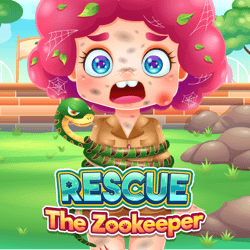
These preview visuals use the default cover art for Funny Rescue Zookeeper to reinforce the tone, pacing, and player fit described in the editorial notes above.
Task Order That Actually Matters
The safest way to play Funny Rescue Zookeeper is to think in chains, not individual clicks. One action usually clears the path for the next, so random tapping creates more confusion instead of faster progress.
Once you spot the main injury, obstruction, or mess in the scene, the rest of the level becomes much easier to decode.
Speed vs Accuracy
- Read the scene once before acting. A two-second scan often prevents a full minute of trial-and-error clicking.
- If several tools appear together, choose the one that directly changes the animal or rescue target first.
- When the stage adds cleanup tasks after treatment, switch mindset from diagnosis to sequence completion.
Best Recovery Habits
- If you lose track of what the level wants, stop clicking and locate the most visually urgent problem again.
- Use repeated scene elements like tools, bandages, or scrub items as anchors for what stage you are currently in.
- Do not assume every new object is immediately relevant. Some only become active after the main step is finished.
Questions New Players Actually Ask
Q: Why does Funny Rescue Zookeeper feel slower than other casual rescue games?
A: Because the game expects you to interpret the scene, not just react. Most of the time loss comes from reading mistakes, not from the animations themselves.
Q: What should I click first when I feel stuck?
A: Return to the most central problem in the scene - usually the injured animal or the largest visible obstacle. That is where the current step usually begins.
Q: Is there a penalty for exploring the wrong object?
A: Usually no hard penalty, but each incorrect click slows your understanding of the scene and makes later steps feel more chaotic.
Source & Rights
This editorial page for Funny Rescue Zookeeper was prepared by Jason Park for GameBrewCove with a focus on sequencing, scene reading, and click prioritization. The embedded game remains owned by its original creator.