Pixel Artist
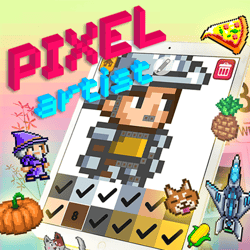 Pixel Artist
 Happy Kittens Puzzle
 Penguin Cafe
 Animal Connection
 Snakes N Ladders
 Pixel Skate
 BeeLine
 Draw Parking
 Draw Racing
 Soccer Balls
 Happy Fishing
 Crashy Cat
FREE GAMES FOR KIDS ONLINE
Category: Puzzle | Written by Jason Park | GameBrewCove Editorial | Last updated: April 30, 2026
Editor note: Pixel Artist looks relaxing because it is, but the page works best for players who treat it like a fill-order puzzle. The cleanest canvases come from deciding which color regions to finish first so you are not bouncing between tiny isolated tiles.
Why It Stands Out
It combines a calm coloring loop with enough structure that better planning noticeably improves each canvas.
Best For
Players who enjoy creative puzzle tasks, low-pressure sessions, and methodical progress through color regions.
Session Length
6 to 15 minutes depending on image complexity and how often you switch palette colors.
Control Style
Tap or mouse painting with palette selection; efficiency comes from minimizing wasted color changes and missed tiles.
From Blank Grid to Finished Canvas
These preview visuals use the default cover art for Pixel Artist to reinforce the tone, pacing, and player fit described in the editorial notes above.
Color Fill Priorities
The best Pixel Artist runs start with large, obvious regions because they reduce canvas clutter and make the remaining small groups easier to identify. Filling random single tiles across the image creates more scanning work later.
That is why the game rewards order, even without a timer. A well-planned sequence simply feels smoother and produces fewer cleanup mistakes.
How to Use the Palette
- Choose one high-frequency color and clear as much of it as possible before switching.
- Use large color regions to orient yourself, then sweep the small isolated tiles of the same color before changing tools.
- If the image has many similar tones, zoom your attention into one local area instead of scanning the full canvas each time.
Mistakes That Break the Canvas
- Switching colors too often and losing track of which tiles were already completed.
- Skipping small isolated cells because they seem harmless, then spending extra time hunting them down later.
- Treating the board like freeform coloring instead of a structured fill-order problem.
Questions New Players Actually Ask
Q: What is the best first move in Pixel Artist?
A: Start with the largest easy-to-see color region. It removes noise from the canvas and gives the remaining work more structure.
Q: How do I avoid missing tiny squares?
A: Sweep each local region completely before switching colors, then do a short visual check of the same area for leftovers.
Q: Why does the game feel slower when I jump around the canvas?
A: Because each jump forces you to re-scan the image and reorient yourself. Staying local reduces that mental reset cost.
Source & Rights
This Pixel Artist page was created by Jason Park for GameBrewCove as original editorial guidance on palette discipline, region planning, and clean canvas completion. GameBrewCove does not own the embedded game or its art assets.